Experiments in Agentic AI, Part VI: Rebuilding the Knowledge Pipeline on Azure
by Alex Harvey
- Introduction
- Architecture: From AWS to Azure
- Azure Architecture Overview
- The Code
- Running Containers on Azure
- The Terraform and GitHub Actions pipelines
- Using Azure OpenAI
- Running the Pipeline
- Reflections on the Migration
- What Comes Next
Introduction
In the previous post, I built a retrieval-augmented generation (RAG) pipeline on AWS. The system consisted of three main components: an ingestion pipeline that downloaded Wikipedia content to an S3 bucket; an indexing pipeline built with LlamaIndex that handled document parsing, chunking, and embedding generation; and a retrieval API implemented with FastAPI that exposed a simple endpoint for answering questions grounded in the indexed documents.
That architecture worked well, but it reflects only a part of the tooling landscape that AI engineers encounter in industry. Many organisations deploy their AI workflows on Azure, particularly with the growing adoption of Azure OpenAI. In this post, I rebuild the same pipeline using Azure services and explore the differences between these two cloud platforms.
Architecture: From AWS to Azure
Readers of the previous post may recall the architecture in AWS as follows:
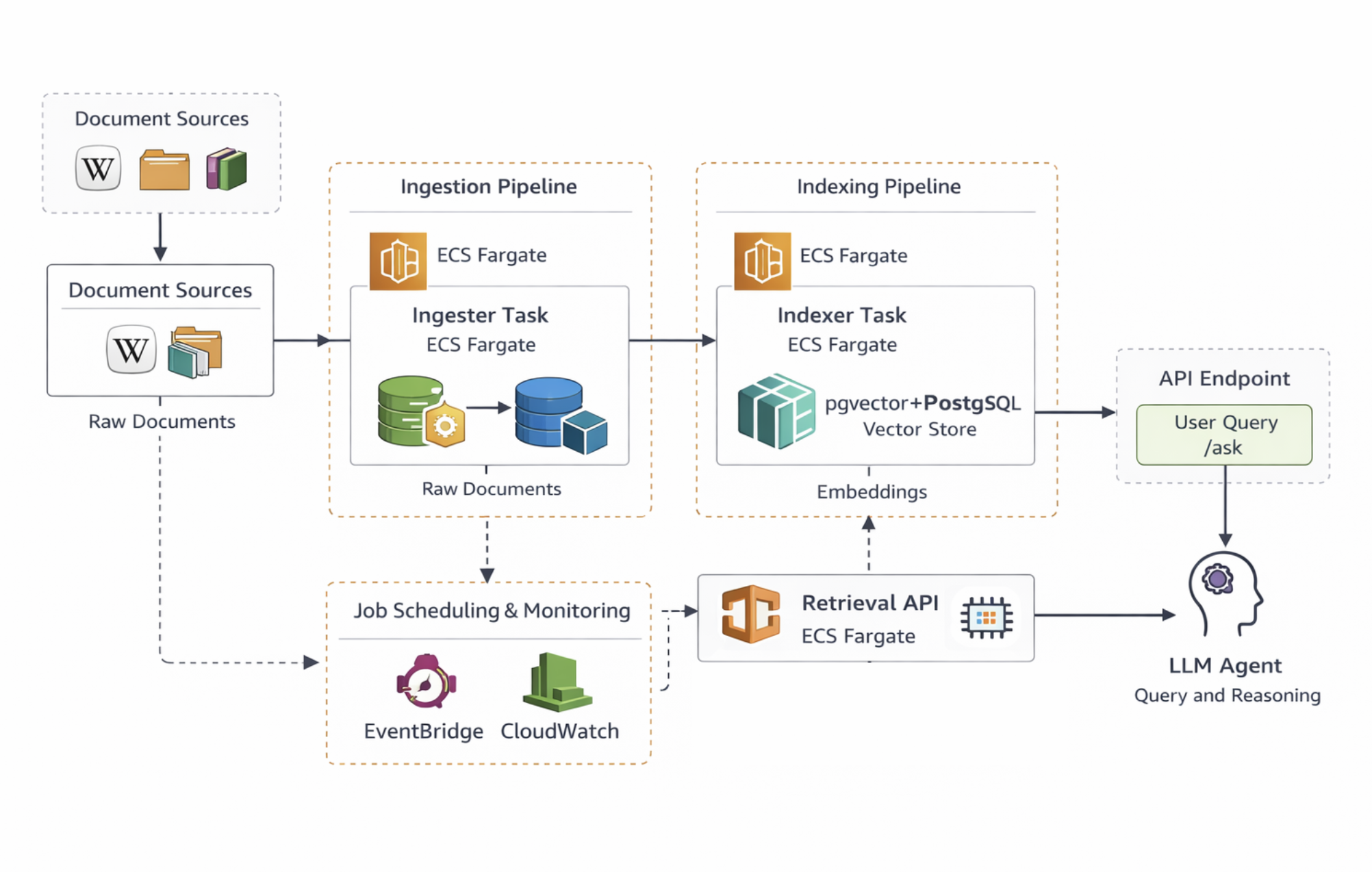
In Azure we can build something very similar. The main differences are that the system runs on Azure Container Apps — a service that sits somewhere between AWS ECS and managed Kubernetes — and that the retrieval layer uses custom logic rather than relying on LlamaIndex at query time.
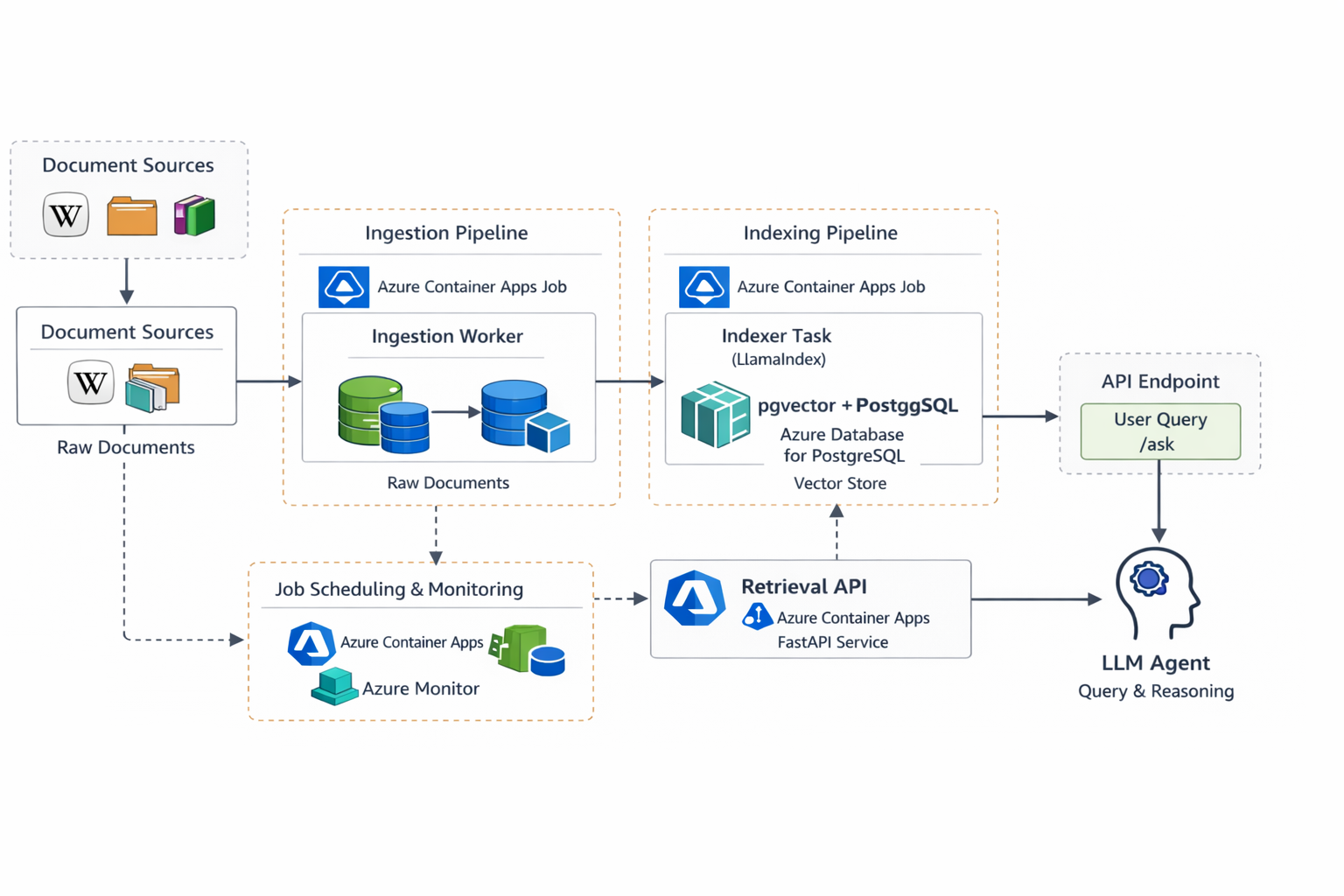
Azure Architecture Overview
The following table shows the rough service equivalents between the two platforms.
| AWS | Azure |
|---|---|
| ECS Fargate | Azure Container Apps |
| ECR | Azure Container Registry |
| RDS PostgreSQL | Azure Database for PostgreSQL |
| S3 | Azure Blob Storage |
| Secrets Manager | Azure Key Vault |
| EventBridge | Container Apps jobs / scheduling |
As before, the ingestion and indexing stages run as containerised jobs, while the retrieval API runs as a long-lived service. Docker remains the common packaging format, which means the same containers used in the AWS implementation can be reused with minimal changes.
Importantly, the overall pipeline structure remains unchanged: ingestion collects documents, indexing generates embeddings, and the retrieval API serves queries over the resulting vector store.
The Code
As always, the full code for the system in this post is available at my GitHub:
https://github.com/alex-harvey-z3q/wiki-rag-azure
Running Containers on Azure
In the AWS version of the system, all compute workloads ran inside ECS Fargate. Both the ingestion worker and indexing job were executed as ECS tasks, while the retrieval API ran as a long-lived ECS service.
In Azure, the closest equivalent is Azure Container Apps.
Azure Container Apps is a managed platform for running containerised workloads without needing to operate a Kubernetes cluster directly. Under the hood, it is built on Kubernetes and KEDA, but most of that complexity is abstracted away. From the perspective of an application developer, it behaves more like a serverless container platform.
Each component of the pipeline — ingestion, indexing, and the retrieval API — runs as a Docker container deployed to Container Apps. The containers themselves are identical to those used in the AWS implementation, which highlights one of the advantages of packaging services with Docker: the runtime environment becomes largely cloud-agnostic.
Container Apps introduces a few concepts that are worth understanding:
- Container Apps A container app is the running service. In this project, the retrieval API is deployed as a container app that exposes an HTTP endpoint.
- Revisions Every deployment creates a new revision of the container app. This makes it possible to roll back to previous versions if something goes wrong.
- Jobs Container Apps also supports short-lived jobs, which are useful for batch workloads such as ingestion or indexing tasks.
- Ingress Container Apps can automatically expose a public HTTPS endpoint for services. In this project, the retrieval API is configured with external ingress so that it can serve requests to the
/askendpoint.
Note however another Azure quirk to be aware of here. Before deploying any services, Azure requires that resources be organised into Resource Groups. A resource group is simply a logical container for related infrastructure — compute services, storage accounts, databases, and networking resources can all be grouped together. In this project, all components of the pipeline are placed in a single resource group so they can be managed, deployed, and deleted together.
From a developer perspective, deploying the API becomes a simple CLI operation:
az containerapp create \
  --name wiki-rag-azure-api \
  --resource-group wiki-rag-azure-rg \
  --image <container-image> \
  --target-port 8000 \
  --ingress external
The Terraform and GitHub Actions pipelines
One consequence of the differences between Azure Container Apps and ECS Fargate is that the boundary between infrastructure and application deployment changed slightly in the Azure version.
In the AWS implementation, Terraform managed a large portion of the runtime environment because ECS services and task definitions form a relatively stable layer of infrastructure. As a result, a significant amount of the deployment logic could live inside the Terraform configuration.
With Azure Container Apps, however, managing application deployments through Terraform is less straightforward. Container Apps uses a revision-based deployment model that changes frequently as new container images are released. Because of this, much of the deployment logic is better handled in CI/CD scripts rather than in Terraform itself.
As a result, the Terraform configuration in the Azure version is considerably smaller. The AWS implementation contained roughly 800 lines of Terraform, about half of which related to ECS configuration, whereas the Azure version contains closer to 330 lines, with more of the deployment logic handled by GitHub Actions.
Using Azure OpenAI
The final component of the system is the language model itself. In the AWS version of the pipeline, the application called the standard OpenAI API directly. On Azure, however, the models are accessed through the Azure OpenAI service.
Azure OpenAI hosts OpenAI models inside the Azure platform and exposes them through Azure-managed endpoints. The models themselves are the same, but they are accessed slightly differently. Instead of specifying a model name directly, Azure requires that each model be deployed inside the Azure OpenAI resource and given a deployment name.
For example, instead of calling a model such as text-embedding-3-large directly, the application calls the deployment created for that model within Azure:
client.embeddings.create(
    model=AZURE_OPENAI_EMBED_DEPLOYMENT,
    input=text
)
The API endpoint also differs slightly from the public OpenAI API. Rather than using api.openai.com, requests are sent to an endpoint associated with the Azure OpenAI resource.
Once the endpoint and deployment names are configured, however, the application logic remains essentially the same. Embeddings are generated from the indexed documents, semantic search retrieves the most relevant chunks from PostgreSQL, and the language model produces a grounded answer.
In practice, the Azure OpenAI integration required only minor adjustments to the codebase. Most of the migration effort lay elsewhere in adapting the surrounding infrastructure.
Running the Pipeline
With the ingestion worker, indexing job, and retrieval API deployed on Azure, the pipeline operates in the same three-stage process described in the previous post.
First, the ingestion job retrieves documents from Wikipedia and stores them in Azure Blob Storage. This stage simply collects and preserves the raw corpus.
Second, the indexing job processes those documents. Using LlamaIndex, the documents are split into chunks, converted into vector embeddings using Azure OpenAI, and stored in PostgreSQL with the pgvector extension.
Finally, the FastAPI retrieval service exposes the /ask endpoint. When a question arrives, the system converts the query into an embedding, performs a vector similarity search over the stored document chunks, and then sends the retrieved context to the language model to generate a response.
Although the cloud services have changed, the logical flow of the system remains identical to the AWS version:
- documents are collected and stored
- embeddings are generated and indexed
- user queries retrieve relevant context
- the language model produces a grounded answer
Reflections on the Migration
Rebuilding the pipeline on Azure demonstrated that the core architecture of a RAG system is largely independent of the cloud provider used to host it. The ingestion, indexing, and retrieval stages remain the same regardless of whether the infrastructure runs on AWS or Azure.
What changes are the surrounding platform services and the operational patterns used to deploy them. Azure Container Apps replaces ECS Fargate for running containerised workloads, Blob Storage replaces S3 for document storage, and Azure OpenAI provides managed access to OpenAI models within the Azure ecosystem.
In practice, most of the application code remained unchanged. The migration was largely an exercise in adapting infrastructure and deployment patterns rather than rewriting the pipeline itself.
What Comes Next
At this point the knowledge pipeline now runs successfully on two different cloud platforms. More importantly, the underlying architecture has proven to be portable: the same ingestion, indexing, and retrieval design works across both environments with relatively minor adjustments.
With this infrastructure in place, the next step in the series will be to return to the original motivation behind these experiments: building more capable AI agents.
Now that the data pipeline is stable and deployable, the system provides a solid foundation on which more sophisticated agent workflows can be built.
tags: agentic-ai - llamaindex